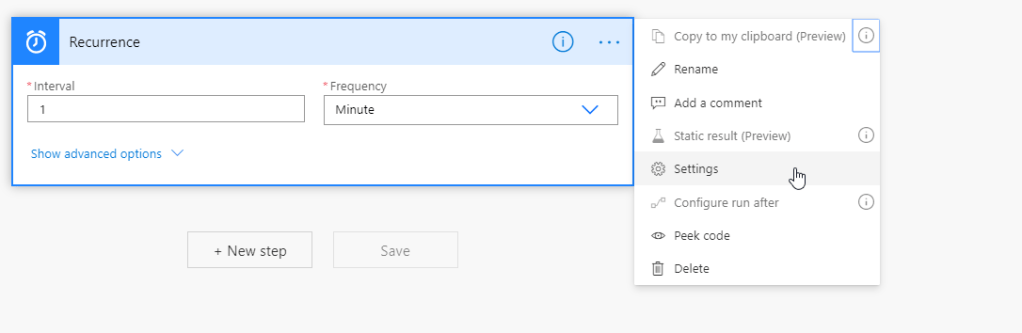
Sometimes it is desirable to only run one flow instance at a time. For example if you have a scheduled flow that are running at a set interval were you are processing some records, you normally do not want another flow instance to start running before you are done processing the first batch to avoid running the same records again. To avoid such scenario, you can enable concurrency control on the trigger. This is done by clicking on the three dots and selecting Settings
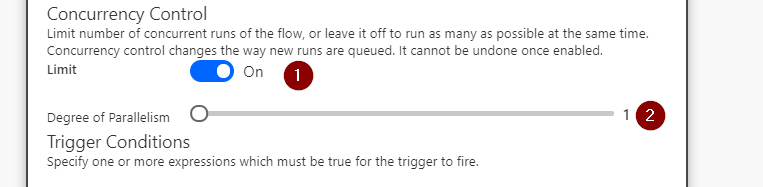
In the new dialog that opens, toggle concurrency control from Off to On and pull the slider down to 1.
Finish by pressing Done
This will ensure that only one instance of your flow are running at the same time.
Today I had a requirement to create a Flow in Power Automate to change owner on accounts that had not been active for a certain amount of time. I thought that did sounded simple so I started with a confidence that this would be a 30min fix. As so many times before I were completley wrong.
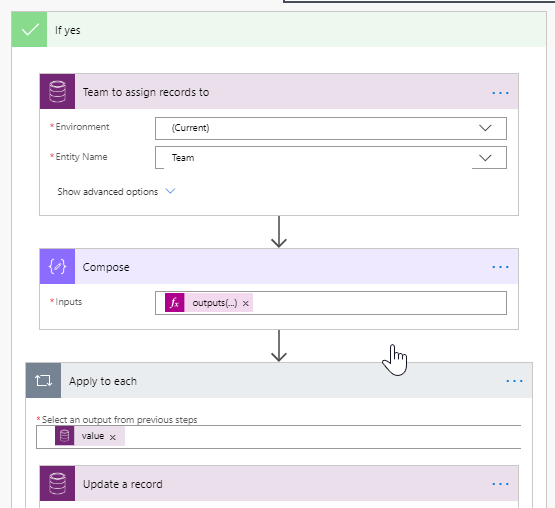
But back to my flow, it looked similar to the one below where I listed all accounts that meet the requested conditions, and for each of the account I would simply set the owner to a common team that could be accessed by a number of people to make sure that this account werent forgotten.
What we are doing is that we are selecting the team to move the accounts to, store the Id using Compose to avoid the need to initialize any variables, and then for each account that we selected earlier in the flow (not showing here), we simply update the account using the Id from the Compose step.
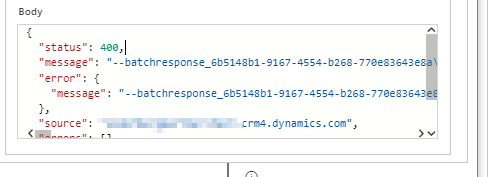
This seems simple enough, but this time I received an http 400 error, saying Bad Request with the following Body. (this is were I should have realized that I could side scroll)
I struggled with this error message for a while before I went back to what I know best, how to code. Using LinqPad I sent a simple Update request with the same values as in my flow, but this time I got back a response that I was familiar with.
client.Update(
 new Entity("account")
 {
	Id = recordId,
	["ownerid"] = new EntityReference("team", teamId)
 });
FaultException`1: Principal team (Id=7ac39076-415d-ea11-a811-000d3ab46b12, type=9, teamType=0, privilegeCount=0), is missing prvReadAccount privilege (Id=886b280c-6396-4d56-a0a3-2c1b0a50ceb0) on OTC=1071 for entity ‘customeraddress’. context.Caller=e1bc9319-9c04-ea11-a811-000d3ab46b12
Finally I realized that my team that I had created for this requirement did not have enough privilegies to perform the operation. After assigning the team to the appropriate roles my Flow succeeded without any error.
To late I realized that the same error message were present in the body of my Update action in my flow, if only had I scrolled to the right!

 No code, Low Code & Just Code